This page explains how to identify and recover from the OpsRamp Gateway Read‑Only Mode alert. The issue can occur on NextGen Gateway deployment and requires manual intervention.
Problem
You may receive the following alert:
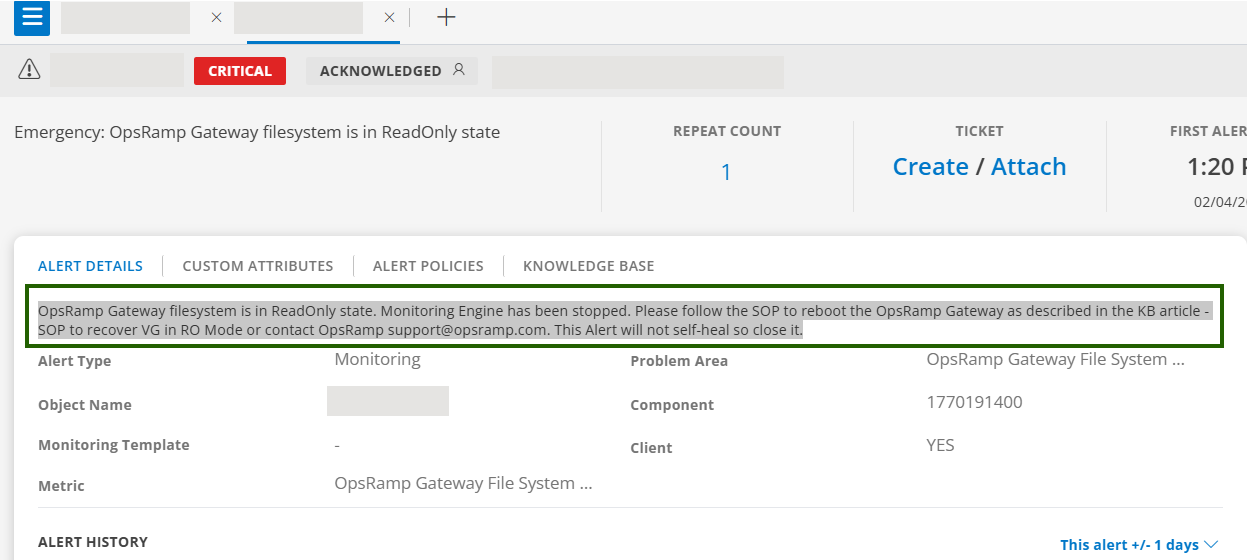
This alert is triggered when:
- The gateway filesystem is mounted as read‑only.
- The monitoring engine is stopped to prevent further issues.
- The alert does not clear automatically after recovery.
As a result,
- Monitoring data collection is interrupted.
- Gateway services that require filesystem write access may stop functioning.
- Manual recovery and alert closure are required.
Procedure
Verify the Read‑Only State
Run the following command on the gateway host or inside the gateway pod to check if the read-only condition exists:
touch /var/log/app/tmp/ro-test.$RANDOMRemediation – NextGen Gateway (Kubernetes)
Check PVC status
kubectl describe pvc vprobe-logs-nextgen-gw-0 -n <namespace>Verify StorageClass / Longhorn
- Confirm the StorageClass is available and healthy.
- Longhorn volumes Healthy (not Degraded), no node disk pressure.
- Restart the gateway pod
kubectl delete pod nextgen-gw-0 -n <namespace> - Reschedule the pod if required. If the issue persists, move the gateway pod to another node:
kubectl edit statefulset nextgen-gw -n <namespace>
Under .spec.template.spec, set the YAML:
nodeName: <new-node-name>- Validate:
- Gateway logs show successful write operations.
- No read‑only filesystem errors are reported.
- Monitoring services are operational.
Best Practices
- Configure log rotation for
/var/logand/var/log/app. - Monitor PVC usage on NextGen Gateways and configure alerts at recommended thresholds.
- Ensure the underlying storage environment remains healthy.
FAQ
- Does the Read‑Only Mode alert clear automatically?
No. The alert does not self‑heal and must be closed manually after the issue is resolved. - Is PVC expansion supported for NextGen Gateway?
Currently, PVC expansion is not supported.
×![]()